
There might be cases when you already have a DMARC record, but EasyDMARC reporting is still inactive in the dashboard.
Let’s analyze the cases when it might happen.
1. The domain was added to EasyDMARC but not verified
When adding a domain to EasyDMARC, it’s required to verify it by activating the Managed DMARC solution or just making sure that EasyDMARC reporting addresses(RUA and RUF) are included in your DMARC record.
If the domain is not yet verified and EasyDMARC reporting addresses are not added to the domain’s DMARC record, EasyDMARC can’t receive your DMARC reports. Hence, EasyDMARC reporting will show inactive.
If the domain has not yet been verified, you either need to activate the Managed DMARC solution. Or, if you want to move forward with a TXT-type DMARC record, just update your existing DMARC TXT record with the one provided by EasyDMARC to make sure that EasyDMARC reporting addresses are included in it.
2. You have duplicate DMARC records
A domain should have only one DMARC record. In case you have multiple DMARC records, it will cause DMARC validation issues. In turn, this will lead to the dashboard not being able to validate your DMARC record to show that EasyDMARC reporting is active.
Please follow the steps in this guide to resolve the duplicate DMARC records issue:
Resolving the Issue of Duplicate DMARC Records for Your Domain
3. Duplication of the domain in the record name
Most DNS providers automatically append the domain name to the record Name/Host field.
Because of this, if you add a DMARC record with the name “_dmarc.example.com”, the DNS provider will append the domain again, resulting in duplication.
In this situation, the DMARC record is actually published for
“example.com.example.com” instead of “example.com”.
As a result, receiving mail servers will not detect a valid DMARC record for example.com, which leads to DMARC not being applied for the domain.
How to check this?
When performing a DMARC lookup, try querying with the domain name appended again at the end. If a record appears only in that case, it indicates that the domain was duplicated in the DNS record name.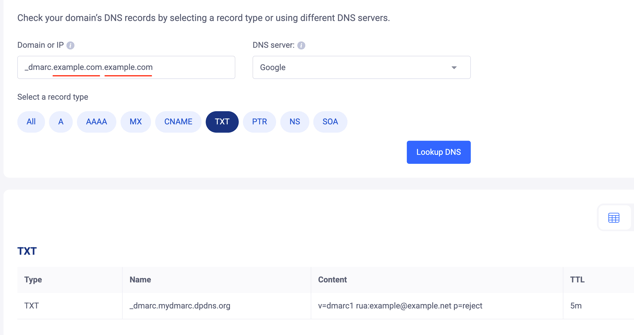
If the DMARC record is found using this query, it most likely means the record was published with the name “_dmarc.example.com” instead of just “_dmarc”.
In case you have any specific questions, feel free to contact EasyDMARC technical support.