
To dismiss the pending actions (warnings) for multiple domains simultaneously, please follow these steps:
-
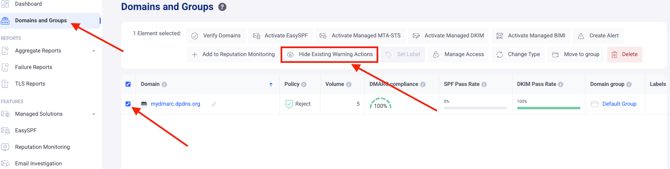
Navigate to the Domains and Groups page.
-
Select the domains for which you wish to dismiss the pending actions.
-
Click the “Hide existing Warning actions” button.
Note: You can only dismiss or hide the Warning type of pending actions. Critical actions must be addressed immediately as they indicate severe issues detected for your domains; dismissing these could lead to negative consequences or security risks.
In case you have any specific questions, feel free to contact EasyDMARC technical support.