
VMC Certificate Monitoring
VMC Certificate Monitoring tracks the status and validity of Verified Mark Certificates (VMC) and BIMI DNS records across your domains. VMC certificates enable your brand logo to appear next to emails in supported email clients such as Gmail. Monitoring ensures this visibility is never interrupted due to an expired or missing certificate.
What is BIMI?
Brand Indicators for Message Identification (BIMI) allows your brand logo to appear next to emails in supporting email clients. It requires a valid DMARC policy and a BIMI DNS record pointing to your brand logo.
What is a VMC?
A Verified Mark Certificate (VMC) cryptographically proves your logo is authentic and trademarked, enabling BIMI to function in all supported email clients. Without a VMC, some email clients may not display your logo.
Getting Started
- From the left-hand sidebar, navigate to Monitoring → VMC.
- You will see the domains available under your EasyDMARC account. These domains are automatically monitored, so no additional setup is required after adding a domain to EasyDMARC.
Certificate Details
The VMC Certificates table provides an overview of the BIMI and VMC configuration for each domain. The following information is available:
- Domain: The domain name.
- Status: Shows the current BIMI/VMC status of the domain. The following statuses may be displayed:
- Valid VMC: A valid BIMI record with a verified VMC certificate.
- BIMI Only: A BIMI record exists, but no VMC certificate is attached.
- No BIMI Record: No BIMI DNS record was found for the domain.
- Invalid BIMI: A BIMI record exists, but it is malformed or misconfigured.
- No VMC: The BIMI record is valid, but no VMC certificate is attached.
- Expired: The VMC certificate has expired.
- Logo: Displays the brand logo extracted from the BIMI record.
- Issuer: The Certificate Authority (CA) that issued the VMC.
- Date Added: The date the domain was added to your EasyDMARC account.
- Valid Until: The date when the VMC certificate expires.
- Days Until Expiry: The number of days remaining until the VMC certificate expires.
- Trademark: Displays the trademark holder's name and country as registered in the VMC.
- Last Checked: The date and time when the domain's VMC information was most recently checked.
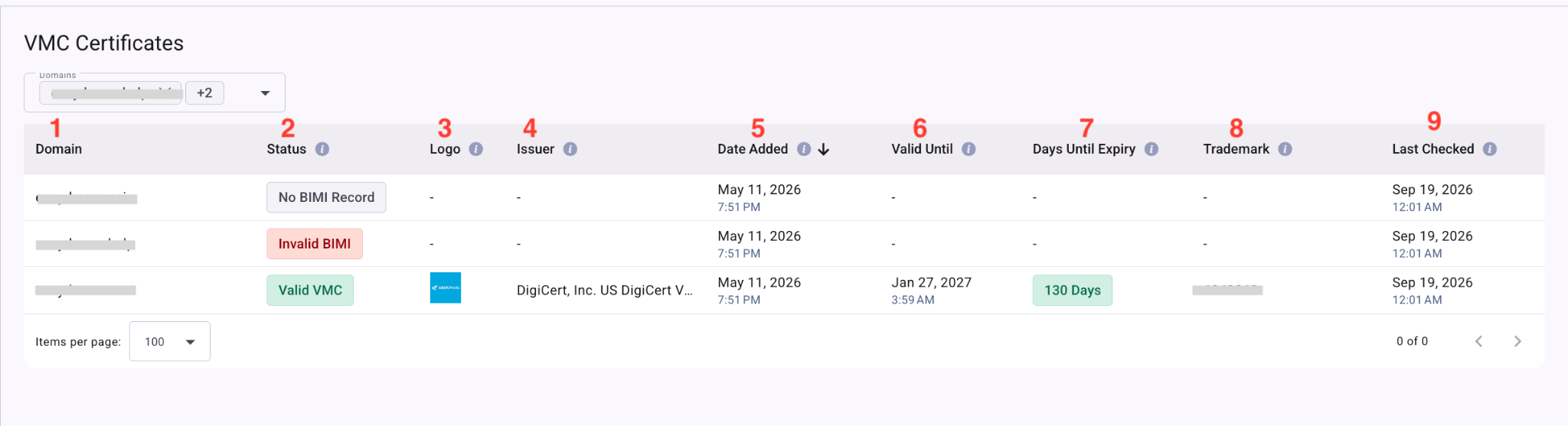
VMC Certificates provides a centralized view of your domains’ BIMI and VMC status, allowing you to easily review certificate details, brand logos, expiration dates, and trademark information. This helps you keep track of your VMC certificates and identify domains that may require attention.