
SSL Certificate Monitoring
SSL Certificate Monitoring helps you keep track of the SSL/TLS certificates associated with your domains. It automatically checks certificate validity and expiry dates, allowing you to identify certificates that are approaching expiration and take action before they expire.
How SSL Certificate Monitoring Works
SSL certificates for domains added to your EasyDMARC account are automatically monitored. The platform regularly checks the certificates, retrieves their details, and tracks the number of days remaining until expiration.Sra
No additional configuration is required after a domain is added to your account. The certificate status and expiry information are automatically displayed in the SSL Certificates section.
Getting Started
To access SSL Certificate Monitoring:
- From the left-hand sidebar, navigate to Monitoring → SSL.
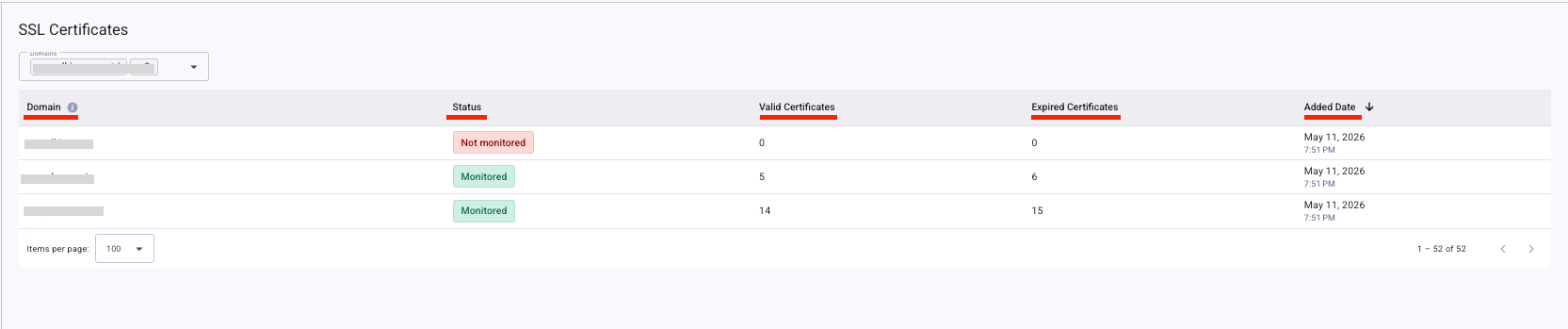
- You will see the domains available under your EasyDMARC account, along with the following information:
- Domain: Displays the list of domains added to your EasyDMARC account.
- Status: Indicates whether SSL monitoring is available for the domain based on whether it has an SSL certificate.
- Valid Certificates: Displays the number of valid SSL certificates associated with the domain.
- Expired Certificates: Displays the number of expired SSL certificates associated with the domain.
- Added Date: Shows the date when the domain was added to your EasyDMARC account.
Certificate Details
Click on a domain to view detailed information about the SSL certificates associated with it.
The certificate details page includes the following information:
- Certificate ID: A unique short ID assigned to the certificate for quick reference.
- Common Name: The main domain secured by the certificate.
- Status: Indicates the current status of the certificate.
- Valid: The certificate is active and trusted.
- Expiring: The certificate will expire within the next 30 days.
- Expired: The certificate is no longer valid.
- Issuer: The Certificate Authority (CA) that issued the certificate.
- Type: Indicates the type of certificate.
- Final: The certificate is actively used to secure HTTPS or email.
- Precertificate: The certificate is logged for transparency before final issuance.
- Self-Signed: A certificate created and signed by the domain itself. It is not trusted by browsers unless manually installed.
- CA Certificate: A certificate used to issue other certificates, such as root or intermediate certificates.
- Validation Type: Indicates the level of identity verification performed for the certificate.
- DV (Domain Validation): Basic validation of domain ownership.
- OV (Organization Validation): Validation of the organization's identity.
- EV (Extended Validation): Extended validation with a higher level of identity verification.
- Public Key Algorithm: The cryptographic algorithm used for the certificate's public key.
- Key Length: The strength of the public key, measured in bits.
- Start Date: The date when the certificate becomes valid.

Certificate Details
To view the full, in-depth details of a certificate, click on the Certificate ID.
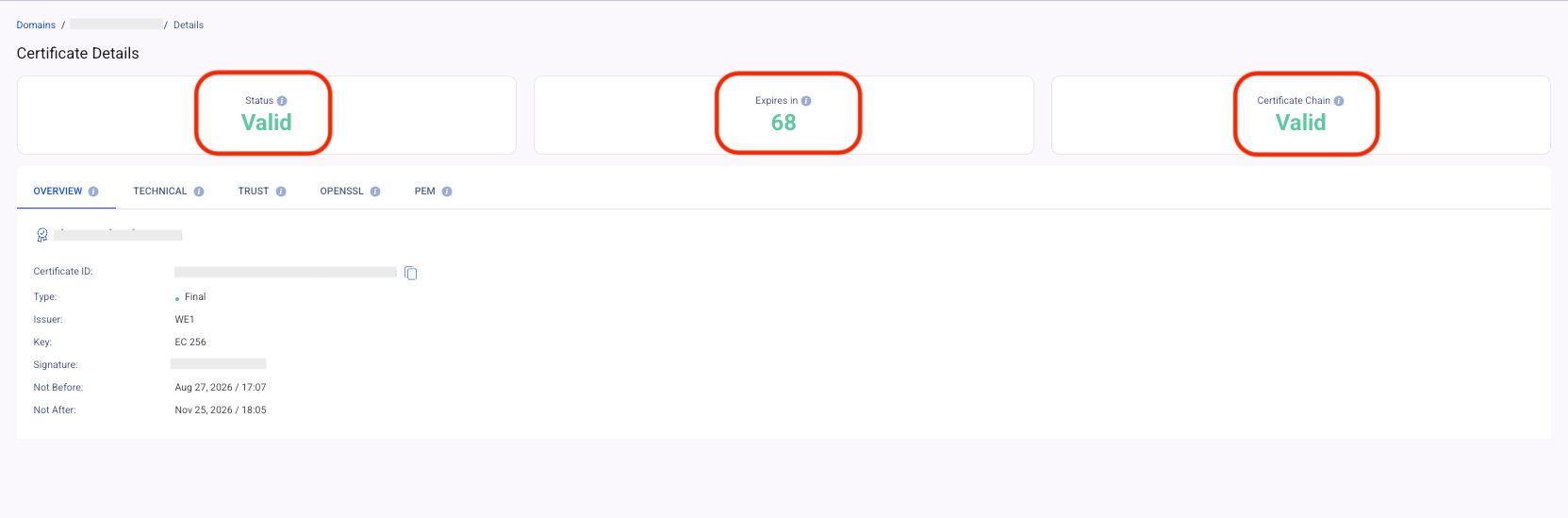
The certificate details page provides the following information:
- Status: Shows whether the certificate is currently Valid, Expiring, or Expired.
- Expires In: Displays the number of days remaining until the certificate expires. Monitoring certificates that are approaching expiration helps ensure they can be renewed in a timely manner.
- Certificate Chain: Indicates whether the complete certificate trust chain is valid. A valid certificate chain is required for browsers to trust the certificate.
Below these indicators, you can find the certificate information presented in detail, including a General Overview, Technical Certificate Details, the complete certificate trust chain, and other certificate-related information.
SSL Certificate Monitoring helps you keep track of your domains’ certificate status, expiration dates, and trust chains. By reviewing certificate details and monitoring expiration status, you can identify certificates that require attention and help prevent certificate-related service disruptions.