
The Spotler GatorMail integration brings your GatorMail campaign delivery and bounce numbers into Sender Insights, next to your DMARC and deliverability data.
You set up the connection once, through the GatorMail API. From then on, EasyDMARC reads your campaign results every 30 minutes.
Before you start
Make sure you have the following from GatorMail. You'll find both under Tools >> Integration >> Security.
- Your GatorMail SDK credentials: your instance name, SDK username and SDK password.
- EasyDMARC's IP addresses on your IP allowlist. GatorMail accepts API calls only from allowlisted IP addresses. On the Security tab, add EasyDMARC's IP addresses to your instance's IP allowlist.
Tip: If you try to connect before adding the IP addresses, EasyDMARC shows you the addresses to add.
Step 1: Start the connection
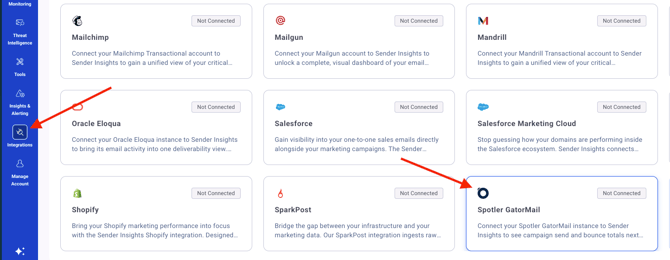
In EasyDMARC, open the Integrations page, select Spotler GatorMail, and select Connect Account.
- Enter an Account Name of your choice.
- Enter your Instance name. Use the name only, not the GatorMail URL.
- Enter your SDK username and SDK password.
- Select Connect.
EasyDMARC checks your credentials and links your GatorMail account.
Add the sending domains you use in GatorMail to the connection. EasyDMARC counts only campaigns sent from these domains or their subdomains.
EasyDMARC reads your GatorMail campaign results every 30 minutes and shows the delivered and bounce numbers for each campaign in Sender Insights.
- Bounces: EasyDMARC reads one total bounce count per campaign. Bounces aren't split by type.
- Delivered: EasyDMARC counts delivered messages as messages sent minus bounces.
The connection is refused and EasyDMARC lists IP addresses. GatorMail blocked the request because EasyDMARC's IP addresses aren't on your allowlist. Add the listed addresses under Tools >> Integration >> Security in GatorMail, then select Connect again.
EasyDMARC can't verify your credentials. Check that Instance name holds the name only, not the GatorMail URL, and that the SDK username and password are copied exactly.
A campaign is missing from Sender Insights. EasyDMARC counts only campaigns sent from the domains you added in Step 3, or their subdomains. Add the campaign's sending domain to the connection. New results can take up to 30 minutes to appear.
If there are still questions or concerns that remain uncovered after checking this article, you can contact EasyDMARC Technical Support.