
The Monitoring section in DNS Manager keeps an eye on your nameservers and DNS record propagation in general - tracking their health and confirming your records resolve correctly whenever queried.
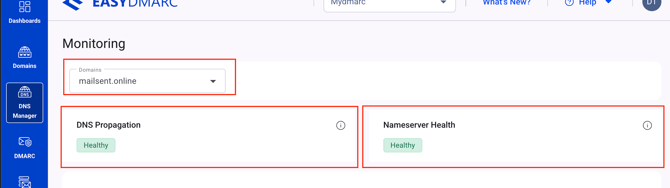
In the header part of the DNS Manager's Monitoring section you have:
1. The dropdown to select the domain you want to check
2. DNS propagation status - we query your domain across global DNS resolvers (Google 8.8.8.8, Cloudflare 1.1.1.1, OpenDNS, Quad9) every 5 minutes. Healthy means all resolvers return consistent, expected values. Warnings or errors indicate propagation delay or inconsistent responses across resolvers.
3. Nameserver health state of the selected domain - We query each of your nameservers every 2 minutes, measuring response time and availability.
This is how we caught the Network Solutions global outage on 6 April 2026 in real time.
Healthy means all nameservers respond within expected latency. Issues here often indicate a provider outage.
Navigating to the "Nameserver Health" section, you will find the information and functionalities mentioned below:
1. DNS Providers - The DNS provider serving each of your nameservers — detected automatically from NS records. Listed here even for providers we don’t directly integrate with.
2. Nameservers - The authoritative nameservers responsible for this domain’s DNS. Most domains have at least two for redundancy.
3. Resolves IPs - IP addresses to which your nameservers resolve
4. Status - "Healthy" if all checks passing. "Issue" if at least one check has failed or is degraded. Click into the row for details if the status is "Issue"
5. Latency time
6. Last check time - When this provider was last polled. Nameserver health runs every 2 minutes.
7. Dropdown to filter by status - All, healthy or issue
In the header part of the DNS Manager's Monitoring section you have:
1. The dropdown to select the domain you want to check
2. DNS propagation status - we query your domain across global DNS resolvers (Google 8.8.8.8, Cloudflare 1.1.1.1, OpenDNS, Quad9) every 5 minutes. Healthy means all resolvers return consistent, expected values. Warnings or errors indicate propagation delay or inconsistent responses across resolvers.
3. Nameserver health state of the selected domain - We query each of your nameservers every 2 minutes, measuring response time and availability.
This is how we caught the Network Solutions global outage on 6 April 2026 in real time.
Healthy means all nameservers respond within expected latency. Issues here often indicate a provider outage.
Below you can see the details of "Nameservers Health" and "DNS propagation" in detail separately.
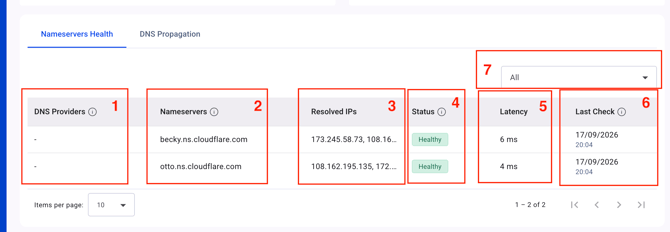
Navigating to the "Nameserver Health" section, you will find the information and functionalities mentioned below:
1. DNS Providers - The DNS provider serving each of your nameservers — detected automatically from NS records. Listed here even for providers we don’t directly integrate with.
2. Nameservers - The authoritative nameservers responsible for this domain’s DNS. Most domains have at least two for redundancy.
3. Resolves IPs - IP addresses to which your nameservers resolve
4. Status - "Healthy" if all checks passing. "Issue" if at least one check has failed or is degraded. Click into the row for details if the status is "Issue"
5. Latency time
6. Last check time - When this provider was last polled. Nameserver health runs every 2 minutes.
7. Dropdown to filter by status - All, healthy or issue
Navigate to the DNS propagation section to see the following detais about your DNS records' propagation:
1. Record type
2. Record value
3. Propagation Status of the record
4. Regions propagated - checks are performed from 11 regions
5. TTL of the record
6. Dropdown to filter the data per Record type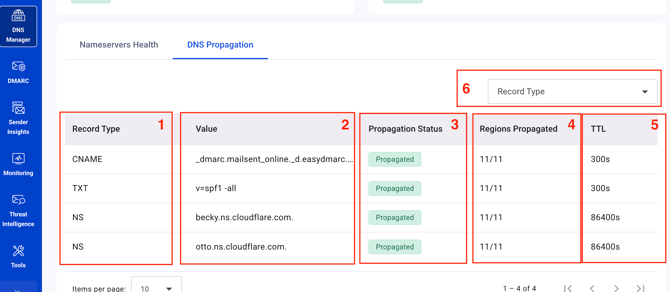
In case you have any questions which are not addressed the guide, please feel free to reach out to EasyDMARC experts.