
EasyDMARC's Managed DMARC solution significantly streamline the implementation and management of DMARC (Domain-based Message Authentication, Reporting, and Conformance) policies.
Here’s how Managed DMARC transforms the approach and benefits organizations:
Simplified Implementation
- CNAME Record Utilization: Unlike the traditional method of using TXT records for DMARC implementation, Managed DMARC services leverage CNAME records. This approach simplifies the DNS configuration process. By pointing a CNAME record to EasyDMARC's managed service, organizations can offload the complexity of configuring and maintaining DMARC records.
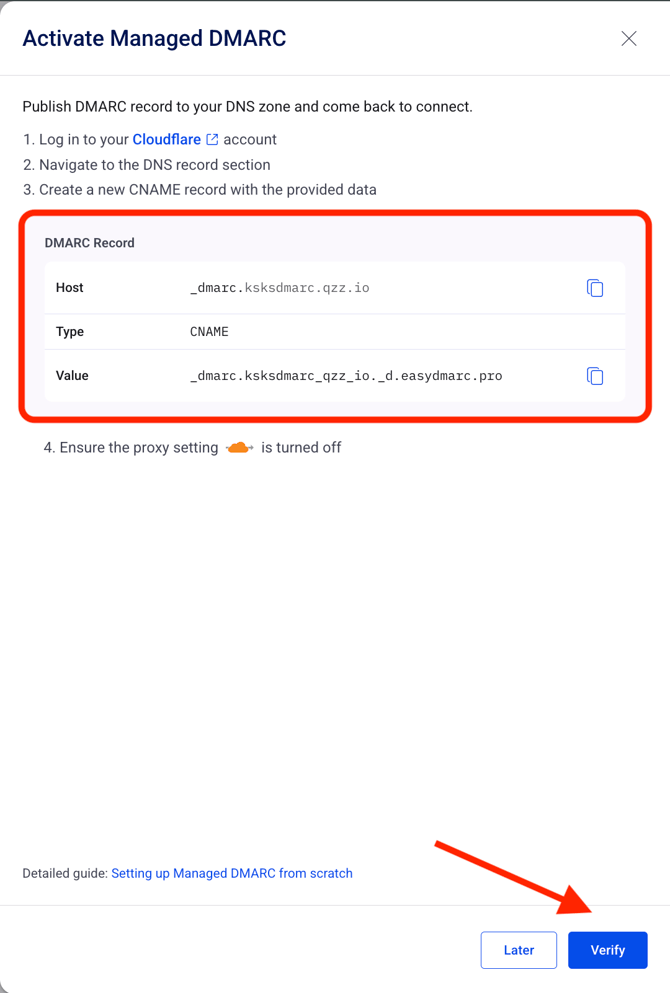
Note: To enable Managed DMARC, simply click on the "Activate" button. Once activated, we will provide you with the necessary CNAME Record that you need to add to your DNS. This step only needs to be done once.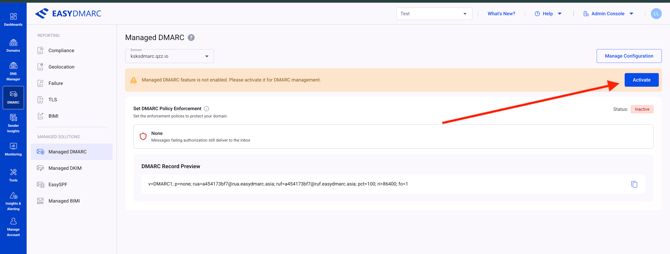
Note: Refer to the following example of a DMARC CNAME record that has been published in the DNS zone. In this example, Cloudflare is used as the DNS provider: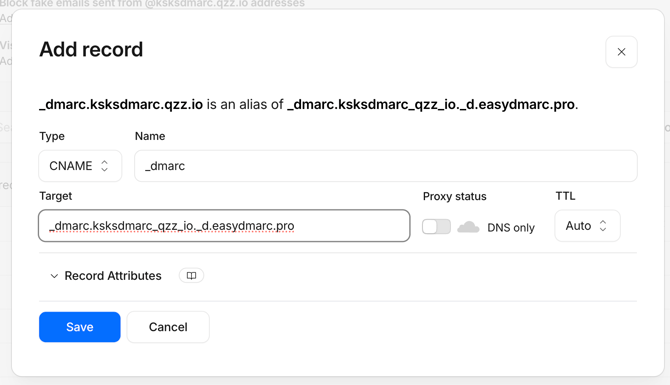
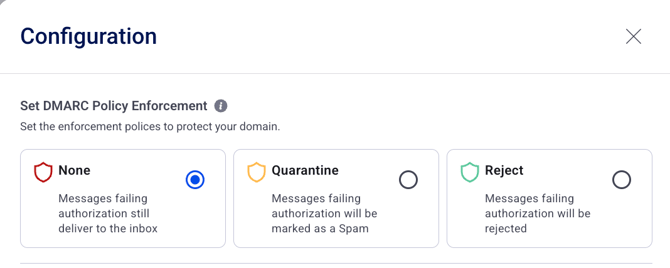
- Automated Policy Management: With Managed DMARC, you can easily adjust your DMARC policy settings directly from the EasyDMARC portal. This includes switching between policies such as p=none, p=quarantine, and p=reject, without manually editing your DNS records. To manage your policy, click "Manage Configurations" in the top-right corner of the Managed DMARC page. From there, you can update your DMARC policy and configure other related DMARC settings.
Aggregate (RUA) Reporting:
- Automated Reporting Address: EasyDMARC automatically assigns a reporting address, ensuring that organizations receive DMARC aggregate and failure reports. These reports are crucial for monitoring and improving email authentication practices.
- Optional Reporting Addresses: Organizations have the option to add additional reporting addresses with just a click. This feature is particularly useful for companies that wish to share DMARC reports with third-party security providers or internal departments for further analysis.
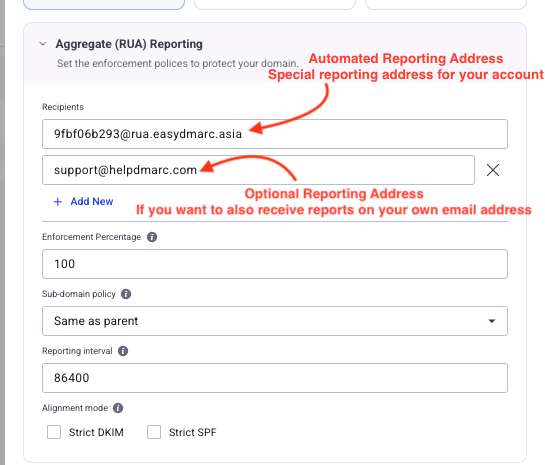
- Enforcement Percentage: Customers can set the enforcement level of the policy as a percentage. The default setting is 100%, unless a different value is explicitly chosen.
- Sub-Domain Policy: Users have the option to apply a specific policy to subdomains that may differ from the root domain's policy. The default setting is "same as parent" unless otherwise specified.I
- Reporting Interval: Users can select a preferred reporting interval. Despite the ability to choose, reports are generated and sent every 24 hours, in line with the DMARC tag's functionality.
- Alignment Mode:
- The default alignment mode is Relaxed for both DKIM and SPF.
- Strict Alignment Option: Users can opt for Strict DKIM and Strict SPF, requiring an exact match between the DKIM and SPF domains with the "From:" domain.
- Relaxed Alignment: In Relaxed alignment, exact matches are not necessary; domains can be a subdomain of the "From:" domain. This is the recommended setting.
Failure (RUF) Reporting:
- Failure Reporting: Similar to the Automated and Optional reporting address configured for Aggregate Reports, EasyDMARC automatically assigns a reporting address for Failure Reports. This allows Failure Reports to be collected and processed without requiring you to manually configure a reporting address.
Note: Failure Reporting is optional. If you do not want to receive or process Failure Reports, you can disable the Failure Reporting option in the EasyDMARC portal 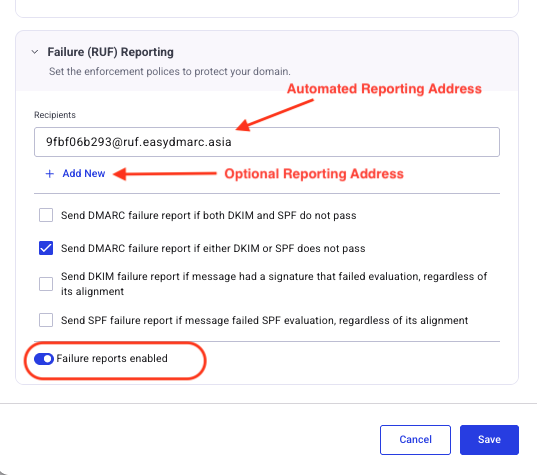
Add or Update your DMARC Record with Managed DMARC
- If you do not currently have a DMARC Record set up and would like to implement Managed DMARC, the process is straightforward.
Once you have registered and added your domain on EasyDMARC, we will provide you with the necessary CNAME Record that needs to be added to your DNS.
For a more detailed guide on how to implement Managed DMARC in your DNS, please refer to this article. -
If you already have a DMARC TXT Record set up, updating it to Managed DMARC is a simple process. You just need to edit your DNS Record and change the Type of the Record from TXT to CNAME. However, in some DNS zones, this option may not be available. In such cases, you will need to delete your existing DMARC Record and create a new one using the CNAME type.
Benefits for Multiple Domain Management
Managed DMARC is especially beneficial for Managed Service Providers (MSPs) or organizations that oversee multiple domains. It provides a centralized platform to manage DMARC records, eliminating the need for direct access to DNS settings for each domain. This centralization not only reduces the risk of syntax errors but also offers a streamlined overview of email security posture across all managed domains.