
Mailchimp is an email marketing and marketing automation platform widely used by small and mid-sized businesses to design newsletters, run automated campaigns, manage subscriber audiences, and track engagement performance.
To integrate Mailchimp with EasyDMARC, please check the steps below:
Prerequisites:
- Admin access to your Mailchimp account
- Access to your EasyDMARC Dashboard
Step 1: Initiate Connection
To begin, navigate to your EasyDMARC integrations page:
1. Log in to your EasyDMARC Dashboard.
2. Navigate to Integrations in the left-hand menu.
3. Locate the Mailchimp card and click Connect.
4. In the Add Connection dialog, enter a recognizable Account Name (e.g., your company name or Mailchimp account label).
5. Click Next.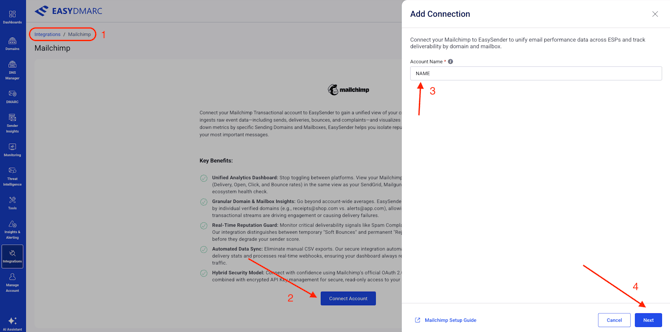
Step 2: Authorize Mailchimp via OAuth
Clicking Next will open a Mailchimp authorization window. EasyDMARC uses OAuth 2.0 — no passwords are stored.
1. Log in to your Mailchimp account if prompted.
2. Review the permissions EasyDMARC is requesting.
3. Click Allow to grant EasyDMARC read access to your campaign and domain data.
4. You will be redirected back to EasyDMARC automatically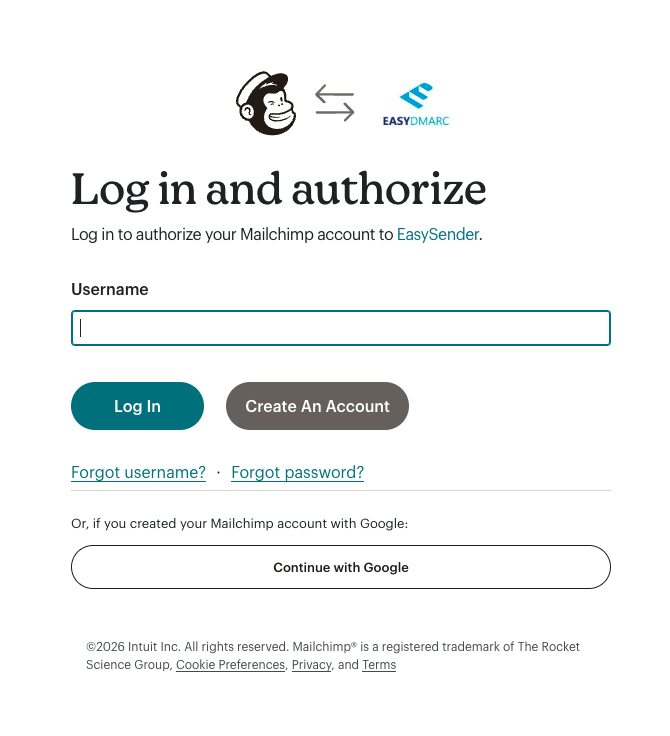
What OAuth grants EasyDMARC:
- Marketing campaign performance data (sends, opens, clicks, bounces — aggregated)
- Audience and list metrics
- Verified sending domain list
- Read-only access — EasyDMARC cannot send, modify, or delete anything in your Mailchimp account
Step 3: Select Domains
After OAuth completes, EasyDMARC will detect all verified sending domains associated with your Mailchimp account.
1. Review the list of detected domains.
2. Check the box next to each domain you want to track in your dashboard (e.g., mail.yourdomain.com).
3. Click Add.
Tip: Select only Verified domains to ensure accurate statistics. Unverified domains may return incomplete or missing data.
If there are still questions or concerns that remain uncovered after checking this article, you can contact EasyDMARC Technical Support.