
The IONOS integration connects your IONOS account to EasyDMARC, so DNS Manager can read and update the DNS records of your IONOS domains.
You connect with an IONOS API key. Once connected, EasyDMARC syncs your IONOS domains, and you choose which ones to add from Discovered Domains.
Before you startMake sure you have the following:
- Domains that use IONOS nameservers. If a domain's DNS is hosted with another provider, connect that provider instead.
- Access to the IONOS account that owns the domains, so you can create an API key with DNS permissions.
- At least one domain in that IONOS account. EasyDMARC can't connect an account with no domains.
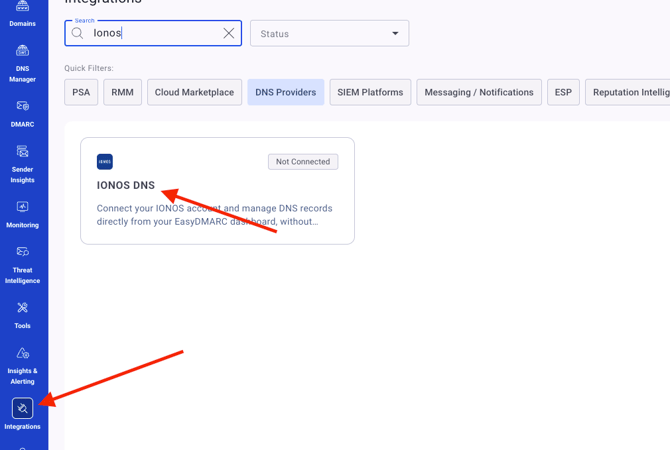
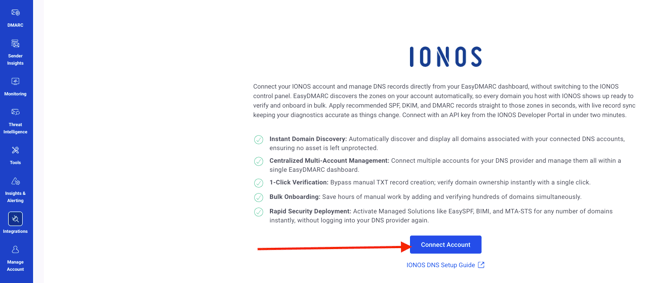
In EasyDMARC, open the Integrations page, select IONOS in the list of DNS providers, and select Connect Account.
- In a new browser tab, sign in to the IONOS Developer portal at developer.hosting.ionos.com.
- Create an API key for DNS.
- Copy the key's public prefix and its secret.
Important: IONOS shows the secret only once. Keep it at hand until you've finished connecting, and treat it like a password.
Step 3: Paste the key in EasyDMARC- Go back to EasyDMARC.
- Enter an Account Name of your choice.
- Paste the public prefix into Public Prefix and the secret into Secret.
- Select Connect.
Each field takes one part only, so don't paste the whole key into one field.
Step 4: Add your domainsEasyDMARC checks the key, connects the account, and starts syncing your IONOS domains. When the sync finishes:
- Open the account's Discovered Domains.
- Select the domains you want to manage.
- Select Add & Verify.
Only domains that use IONOS nameservers appear in Discovered Domains.
Managing the connection
- Find your account: Your IONOS account appears in the accounts list of the IONOS integration. If the Public Prefix column is cut off, hover over it to see the full public prefix.
- Use a different key: Disconnect the account, then connect it again with the new key.
"The provided API key is invalid." Check that the public prefix and the secret are each in their own field and copied whole, then try again.
"Please ensure that the provided API key has DNS management permissions." Create a key with DNS permissions in IONOS and connect again.
"API Key has already been used with another Organization." A key works for one EasyDMARC organization only. Create a separate key in IONOS.
"This account has no domains." Add at least one domain to the IONOS account, then connect again.
A domain doesn't appear in Discovered Domains. Either it isn't in the IONOS account the key belongs to, or it doesn't use IONOS nameservers. Create a key in the IONOS account that owns the domain, or connect the provider that hosts its DNS.
If there are still questions or concerns that remain uncovered after checking this article, you can contact EasyDMARC Technical Support.