
If you need to switch devices or update your security settings, you can manage your MFA configuration directly from your profile.
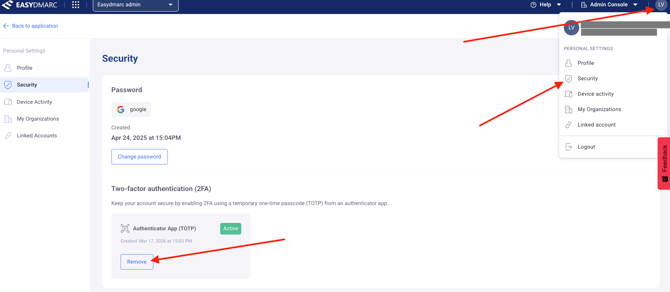
1. Access Security Settings: Click on your Profile Icon in the upper-right corner of the EasyDMARC dashboard and select Security.
2. Locate the 2FA Section
3. Initiate Removal: Click the Remove button next to your active 2FA/MFA method.
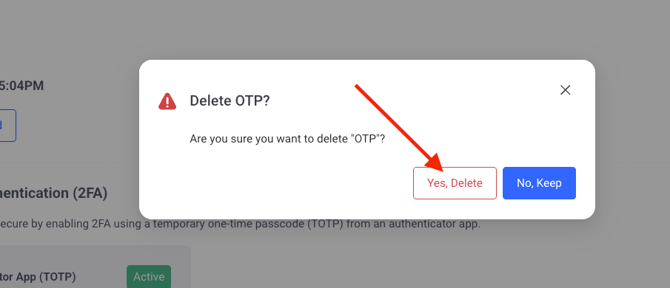
4. Confirm the Action: A pop-up will appear asking you to confirm. Once you verify the action, the existing 2FA configuration will be removed from your account.
5. Re-configure (Optional): You can now set up a new authenticator app by following the MFA configuration guide or leave it disabled.
Note: If you are currently locked out of your account and cannot reach these settings, please contact EasyDMARC support team for identity verification and a manual reset.
1. Access Security Settings: Click on your Profile Icon in the upper-right corner of the EasyDMARC dashboard and select Security.
2. Locate the 2FA Section
3. Initiate Removal: Click the Remove button next to your active 2FA/MFA method.
4. Confirm the Action: A pop-up will appear asking you to confirm. Once you verify the action, the existing 2FA configuration will be removed from your account.
5. Re-configure (Optional): You can now set up a new authenticator app by following the MFA configuration guide or leave it disabled.
Note: If you are currently locked out of your account and cannot reach these settings, please contact EasyDMARC support team for identity verification and a manual reset.