
The "Insights" section in DNS manager covers the findings across all your verified domain in your account.
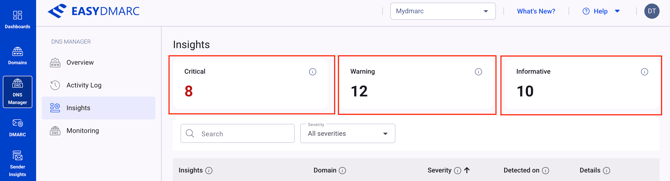
The header part in "Insights" section shows all findings per their severity levels:
Critical - issues that break or imminently threaten DNS resolution, email delivery, or domain security. Examples: SPF lookup overflow, broken DNSSEC chain, CAA-cert mismatch, stale verification records that enable subdomain takeover.
Warning - misconfigurations that create risk or weaken security but don’t break anything immediately. Examples: DNSSEC not enabled, DMARC policy set to “none”, parked domain with active MX records.
Informative - best-practice nudges with no immediate risk. Examples: missing security.txt, missing abuse mailbox, single MX (no redundancy).
Next, you will find the open intelligence findings with their:
1. Insights name - the name of the check that produced this finding.
2. Descriptions
3. Domain column showing which domain the insight refers to
4. Severity - Critical — immediate action needed (breaks something now or imminently). Warning — should be fixed (creates risk or weakens security). Informative — good to know (best-practice nudge, no immediate risk).
5. Detection time - When we first detected this issue. Older findings that haven’t been resolved deserve a closer look — they often indicate a configuration the team has forgotten about.
6. Details with the button "View details" - Open the full finding detail — what triggered it, the records affected, and the suggested remediation steps.
7. Search bar for searching insights per domain or insight type
8. Dropdown to filter the insights per severity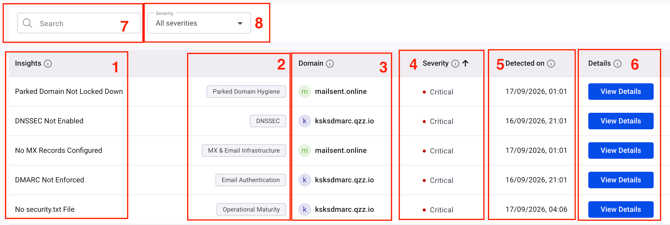
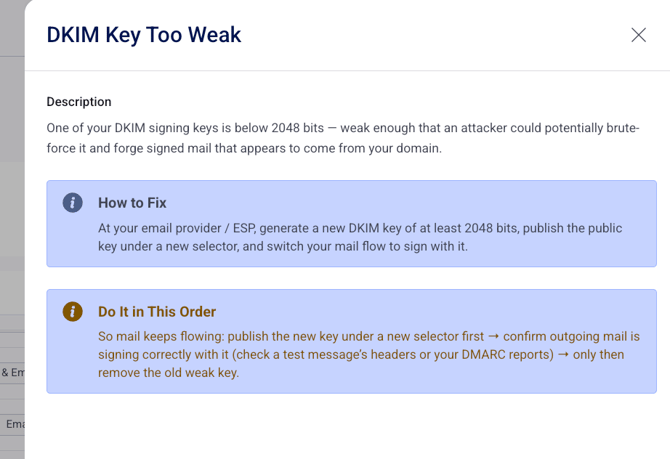
When clicking the "View Details" button, you will be presented with a sidebar describing the finding, providing the option on how to fix it and the explanation on why it would be helpful:
In case you have any questions which are not addressed the guide, please feel free to reach out to EasyDMARC experts.