
A DNS Record Checker is a valuable tool that allows users to inspect and analyze the Domain Name System (DNS) records associated with a specific domain. The DNS is a crucial component of the internet infrastructure, translating human-readable domain names into numerical IP addresses that computers use to identify each other. Checking DNS records is essential for ensuring proper domain functionality, email delivery, and overall internet security.
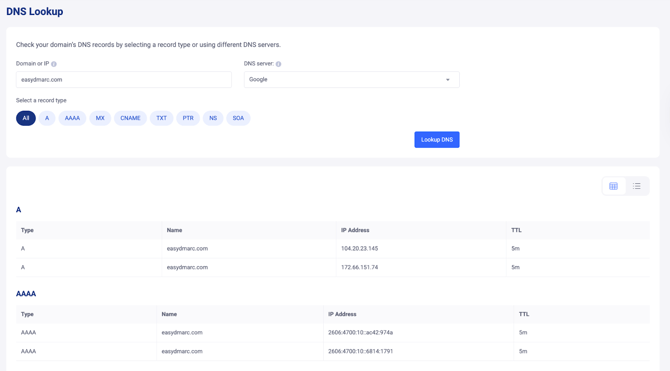
Here's a breakdown of what a DNS Record Checker typically does:
Record Verification:
The tool verifies the existence and correctness of essential DNS records, including A (Address) records, CNAME (Canonical Name) records, MX (Mail Exchange) records, TXT (Text) records, and more.
IP Address Lookup:
It performs an IP address lookup for the domain, providing information about the associated IP addresses. This is crucial for understanding the web hosting or email server infrastructure linked to the domain.
Mail Exchange (MX) Records:
For email-related checks, the DNS Record Checker examines the MX records, ensuring they point to the correct mail servers. This is vital for the proper functioning of email delivery.
Text (TXT) Records:
It inspects TXT records, which are commonly used for various purposes, including SPF (Sender Policy Framework) and DKIM (DomainKeys Identified Mail) authentication.
Name Server (NS) Records:
The tool checks NS records to identify the authoritative name servers for the domain. This information is crucial for domain management and resolution.
CNAME Records:
If applicable, it verifies CNAME records, which alias one domain to another. This is often used for subdomains or domain redirection.
Overall DNS Health:
Some DNS Record Checkers provide an overall assessment of the domain's DNS health, flagging any issues or inconsistencies that may impact the domain's functionality or security.
User-Friendly Interface:
The tool typically features a user-friendly interface, making it accessible for users with varying levels of technical expertise. Users can input a domain, and the checker presents the results in an easily understandable format.
If you experience any limitations, do not hesitate to open a support ticket using this link. Our support team will gladly assist you.