
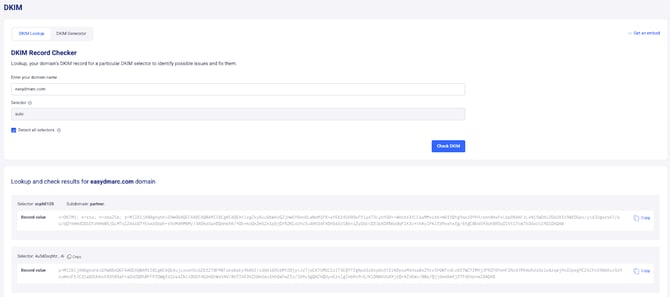
DKIM is an email authentication method designed to verify the authenticity of the sender and the integrity of the email's content. It involves the use of cryptographic signatures added to outgoing emails. To check DKIM records for a domain, you typically inspect the DNS (Domain Name System) records associated with that domain.
Here are the general steps to check DKIM records:
1- Identify DKIM Selector: A DKIM record is associated with a specific selector. The selector is a string of characters that indicates which public key should be used to verify the email's signature.
2- DNS Lookup: Use a DNS lookup tool or command to query the DNS records for the DKIM information. The DKIM record is usually stored as a TXT record under a subdomain created by appending the selector to _domainkey. For example, if the selector is "selector1," the subdomain would be selector1._domainkey.yourdomain.com
3- Inspect the DKIM Record: The DKIM record retrieved from the DNS should contain information about the public key and other settings associated with DKIM for that domain.
4- Verify Signature: If you have received an email claiming to be from a specific domain, you can use the DKIM information from the email's header to verify its authenticity by checking the signature against the public key retrieved from the DKIM record.
Note: Please note that our tool offers a unique feature by actively detecting the in-use DKIM selectors. It accomplishes this by analyzing Aggregate Reports received thus far.
If your domain does not yet have sufficient data, our tool will cross-reference with our extensive database of selectors to provide you with information on the in-use DKIM keys associated with your domain. This ensures a comprehensive and accurate representation of your DKIM, enhancing the overall effectiveness of your email authentication setup.
DKIM Record Generator
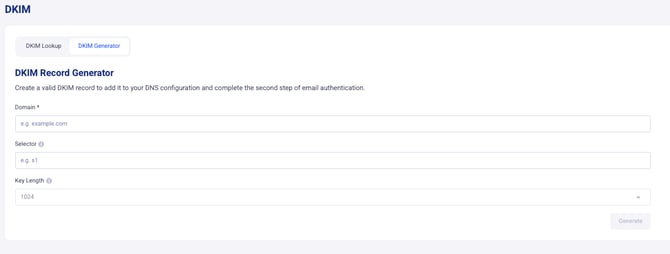
A DKIM Record Generator is a tool or service designed to simplify the process of creating the DKIM records needed for email authentication. DKIM (DomainKeys Identified Mail) is an email security protocol that adds a digital signature to outgoing emails, allowing the recipient's mail server to verify the authenticity of the sender and the integrity of the message.
Here are the general steps involved in using a DKIM Record Generator:
1- Input Information: Typically, users are required to input specific information such as the domain name, DKIM selector, and other configuration details. The selector is a unique identifier for the public key associated with DKIM.
2- Generate Keys: The DKIM Record Generator will then generate a pair of cryptographic keys—a private key and a corresponding public key. The private key is kept secure on the sender's mail server, while the public key is included in the DKIM DNS record.
3- Create DKIM Record: Using the generated keys and other configuration details, the DKIM Record Generator creates the DKIM record. This record is a TXT record that needs to be added to the DNS settings for the domain.
4- Publish DKIM Record: The generated DKIM record is published in the DNS settings for the specified domain. This allows receiving mail servers to retrieve the public key and use it to verify the DKIM signature of incoming emails.
5- Configure Email Server: The private key generated by the DKIM Record Generator is configured on the sender's email server. This key is used to sign outgoing emails.
By using a DKIM Record Generator, organizations and email senders can streamline the process of implementing DKIM for their domains, enhancing email security and helping prevent email spoofing and phishing attacks.
DKIM Issue Detection
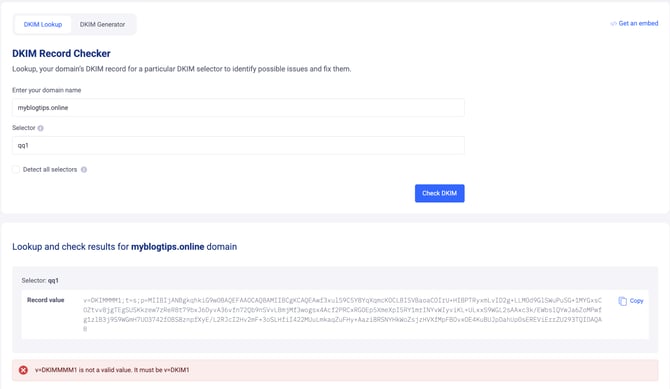
The tool is also designed to help you monitor, verify, and troubleshoot your DKIM records to ensure your emails are properly authenticated. Misconfigured or missing DKIM records can lead to email delivery issues or increase the risk of spoofing.
Here’s how the DKIM Issue Detection tool works:
1- Automatic Issue Detection: The tool scans your DKIM records and automatically identifies potential issues that could prevent proper email authentication.
2- Error and Misconfiguration Highlights: It flags errors and misconfigurations in your DKIM setup, making it easier for administrators to analyze and understand the problems.
3- Selector Verification: The tool checks for missing or incorrect DKIM selectors, ensuring that your public keys are correctly configured in your DNS.
4- Improved Email Deliverability: By detecting and fixing DKIM issues, the tool ensures that your emails are properly authenticated, reducing the risk of them being marked as spam or rejected by receiving mail servers.
If you experience any limitations, do not hesitate to open a support ticket using this link. Our support team will gladly assist you.