
You can now transfer the ownership of your Organisation to another User directly from our dashboard. You simply need to follow the below steps to complete the transfer within a few minutes.
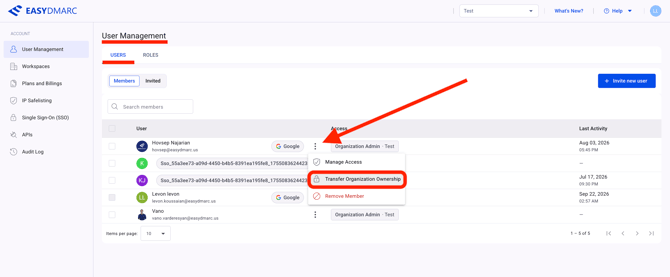
1. Go to Manage Account > User Management and click the three-dot menu next to the user you want to transfer the organization ownership to.Important: Ownership can only be transferred to a User with the Organisation Admin role. If the current user is not listed, you can invite them easily to your EasyDMARC tenant.
Important: New Owner or your Organisation cannot own another Organisation at the same time. In case you select such a User, you will be presented with the below notification and prompt to change the User.
2. Select Transfer Organization Ownership. A confirmation pop-up will appear.
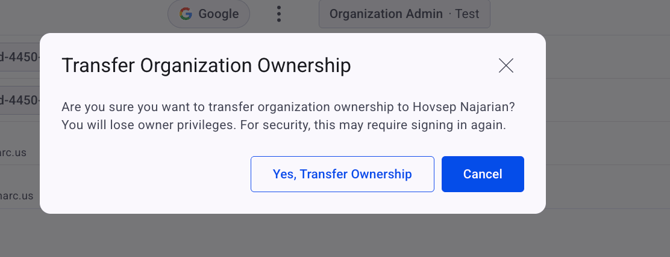
Review the information and confirm the ownership transfer.
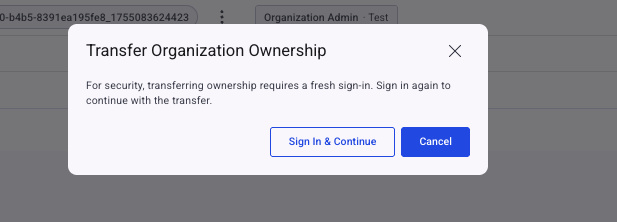
3. After confirming the transfer, another pop-up will appear asking you to sign in again.
Follow the prompts to re-authenticate and continue accessing the platform. This additional verification is required for security purposes.
Afterwards you will receive a notification with confirmation that your role has been updated to Organization Admin and at the same time new Organization Owner will receive a dedicated email with confirmation on changing his role to Organization Owner.
If you have any questions, contact the EasyDMARC support team at support@easydmarc.com.