
Campaign Monitor is an email marketing platform that lets businesses design, send, and track email campaigns, with tools for automation, list segmentation, and detailed engagement analytics. It is commonly used by agencies managing email marketing for multiple clients.
To integrate Campaign Monitor with EasyDMARC, please check the steps below:
1. Access API & integrations page in Campaign Monitor:
After logging in to your Campaign Monitor account, click your profile picture in the upper-right corner and select Account settings.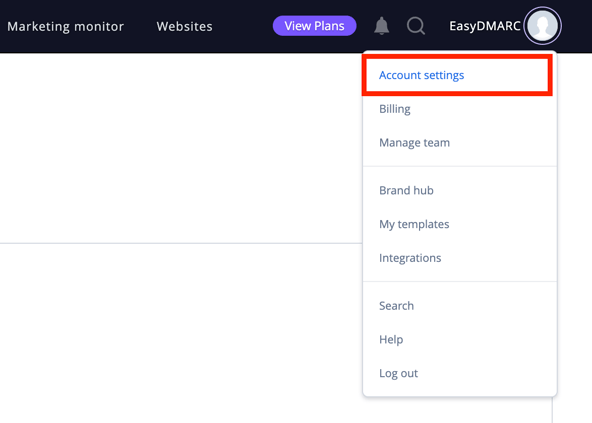
2. Copy the values:
Navigate to the API & Integrations section and copy the API Client ID and API Key: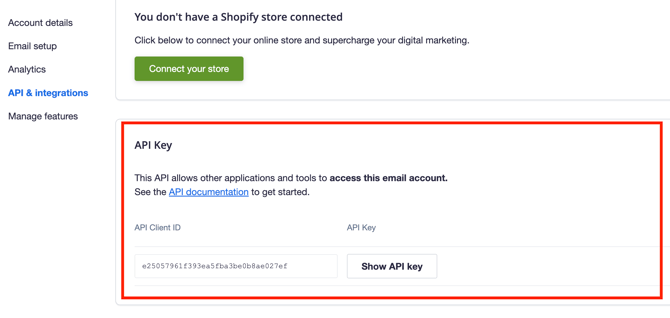
3. Initiate Connection:
Log in to your EasyDMARC platform, navigate to Integrations, and select the Campaign Monitor integration. Then, click “Connect Account” in your EasyDMARC dashboard.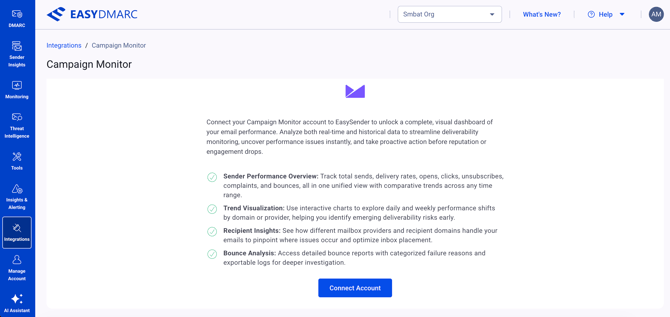
4. Authorize:
Paste the copied values into the corresponding fields in the opened window, and click Next: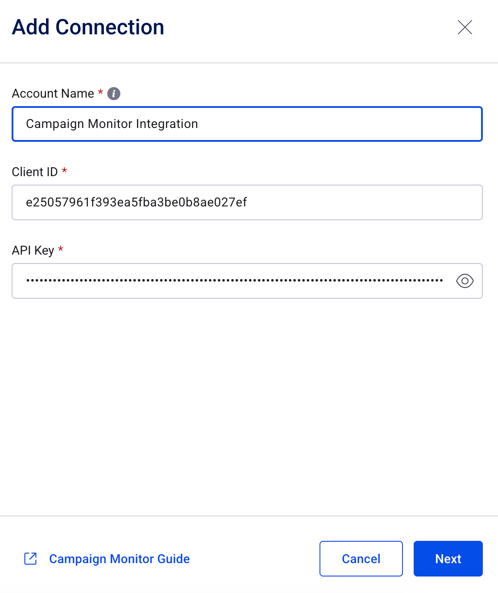
5. Repeat (Optional):
If you manage multiple clients (e.g., as an agency), repeat the setup process to add additional client dashboards.
If there are still questions or concerns that remain uncovered after checking this article, you can contact EasyDMARC Technical Support.