
1. What APRF is
APRF (Aggregate Performance Reporting) is an emerging email reporting standard, currently an IETF draft. It lets participating mailbox providers send daily aggregate reports directly to domain owners.
DMARC aggregate reports tell you whether your mail authenticated and what your policy did about it. APRF reports something different — what happened after delivery:
- Placement — whether messages were delivered to the inbox or to the spam folder.
- Recipient engagement — aggregated signals of how recipients acted on your mail.
Comcast / Xfinity is currently the only mailbox provider sending APRF reports. Figures therefore cover mail delivered to Comcast and Xfinity addresses, not your deliverability overall. Other providers will appear automatically as they adopt the standard, with no changes needed on your side.
Specification: draft-brotman-aggregate-performance-reporting
How it works
- Discovery. Mailbox providers read the signing domain (d=) and selector (s=) from the DKIM signature on your mail, and look up the APRF record at <selector>._aprf._domainkey.<signing domain>.
- Daily reporting. Once a day, the provider sends a JSON report covering one signing domain and selector, containing placement counts and engagement counts.
- Privacy bands. Volumes are rounded up into bands to protect recipient privacy. Comcast's smallest band is 100, with 1,000 and 10,000 bands also in use — so 118 messages is reported as 200. A reported 0 is always exact.
- Ingestion. EasyDMARC receives the reports, parses them, matches each one to a sending source, and presents the results in Sender Insights.
DMARC → Managed Solutions → Managed APRF
Managed APRF sets up and maintains the APRF record for a domain.
How it differs from Managed DKIM
|
Managed DKIM |
Managed APRF |
|
|---|---|---|
|
Records needed |
One per selector, each with its own key pair |
One record for the whole domain |
|
Record |
<selector>._domainkey.<domain> |
*._aprf._domainkey.<domain> |
|
Per-source setup |
Required for every sending service |
None — the wildcard covers all selectors |
Activating
Option A — Managed DKIM already active
If the domain is already delegated to EasyDMARC through Managed DKIM, no DNS changes are needed. Select Activate Managed APRF, and EasyDMARC publishes the record in the hosted zone for you.
Option B — publishing the record yourself
- Select Activate Managed APRF to open the setup panel.
- Log in to your DNS provider.
- Add the TXT record shown below.
- Return to EasyDMARC and select Verify.
|
Field |
Value |
|---|---|
|
Host / Name |
*._aprf._domainkey (or *._aprf._domainkey.yourdomain.com) |
|
Type |
TXT |
|
Value |
v=APRFv1; rua=mailto:<your EasyDMARC reporting address> |
DNS changes can take a few hours to take effect. EasyDMARC also re-checks in the background, so you don't have to return and verify manually.
Status lifecycle
|
Status |
Meaning |
|---|---|
|
Inactive |
Not yet configured for this domain. |
|
Pending setup |
Record generated, but not yet found in DNS. |
|
Pending first report |
Setup confirmed. Waiting for the provider's first daily report, usually within 24–48 hours. |
|
Active |
Record verified and reports are being processed. |
|
Issue detected |
The record is no longer found in DNS, so new data has stopped arriving. Existing data is unaffected. |
A gap in reports does not always mean a problem with your setup. Providers send on their own schedule, and may not report on days when there is little or no mail.
3. APRF toolsTools → APRF
Two standalone tools for generating and diagnosing records, available with or without an account.
APRF Record Checker
Inspects the live APRF setup for any domain.
Inputs
- DKIM signing domain. The domain in your DKIM signature (the d= value). This is often not the same as your From domain.
- Selector (optional). Enter one selector, or leave empty to check the selectors we can find plus any wildcard record.
What it checks
- Resolves <selector>._aprf._domainkey.<domain> and the wildcard equivalent.
- Follows CNAMEs through to the final TXT record.
- Validates the version tag, the reporting address, and the optional segmentation tag.
- Checks whether the domain receiving your reports is authorised to accept them, when it differs from your signing domain.
Results
|
Result |
Meaning |
|---|---|
|
Valid |
A record exists with v=APRFv1 and a correctly formatted reporting address. |
|
Invalid |
A record exists but will be ignored by providers. The specific fault is named — a missing or incorrect version tag, a missing or malformed reporting address, or a malformed segmentation tag. |
|
No record found |
No APRF record is published for that domain or selector. |
A separate warning appears when the reporting address sits on a different domain and we can't confirm that domain has authorised it. The record itself remains valid — some providers check this before sending, so reports may not arrive until it is published.
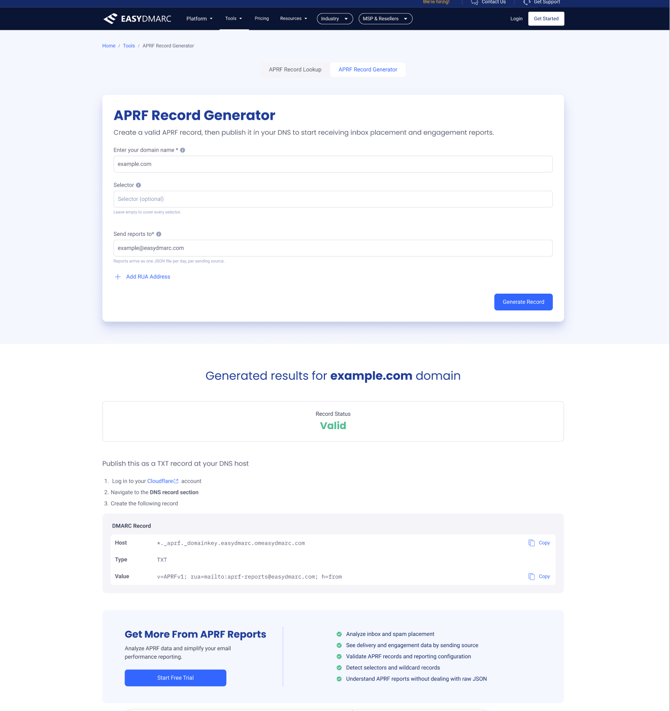
APRF Record Generator
Builds a record for you to publish.
Inputs
- DKIM signing domain. The domain used in your outgoing DKIM signatures.
- Selector (optional). Leave empty for a wildcard record covering every selector on the domain.
- Send reports to. Inside the platform this is prefilled with your EasyDMARC reporting address, so reports reach your dashboard. You can add further addresses to receive a copy yourself.
Output
Host: *._aprf._domainkey.yourdomain.com
Type: TXT
Value: v=APRFv1; rua=mailto:<your EasyDMARC reporting address>
4. Sender Insights — Aggregate Performance Reports
Sender Insights → Post-send → APRF Rep
Reading the numbers
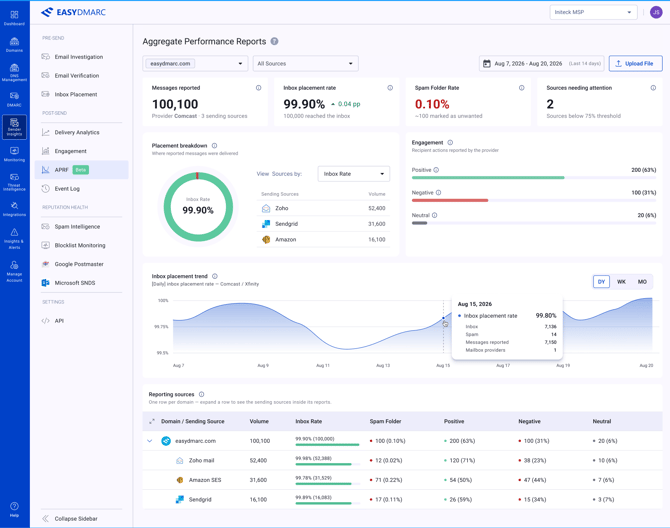
- Volumes. Providers report in bands and round up, so counts may shown with a tilde (~) and indicate scale rather than exact figures.
- A reported zero is exact. "No mail reached the inbox" and "no negative actions" are reliable statements at any volume.
- Percentages need volume. Rates are shown only where reported volume reaches 1,000 in the selected range. Below that, counts are shown instead.
- Engagement is counted in actions, not messages. One recipient can produce more than one action, and an action may relate to a message received before the selected period — so engagement is never shown as a share of messages.
Widgets
|
Widget |
What it shows |
|---|---|
|
Messages reported |
Approximate volume the reports cover in the selected range. This is not a send volume. |
|
Inbox placement rate |
Share of reported messages delivered to the inbox. |
|
Spam folder rate |
Share of reported messages the provider's filters sent to spam or junk. This is the provider's decision, not a recipient marking mail as spam. |
|
Sources needing attention |
Sending sources where no mail reached the inbox, or where the inbox rate is below 75% with enough volume to be reliable. |
Charts
Placement breakdown
The split between inbox and spam folder, with sending sources listed alongside. The list can be sorted by inbox rate, spam rate or volume.
Engagement
Recipient actions reported by the provider. The standard groups them into categories rather than reporting each action, and each provider decides what belongs in each category. The examples the standard gives are:
|
Category |
Examples given by the standard |
|---|---|
|
Positive |
Opening a message, clicking a link, or marking it as "not spam". |
|
Neutral |
Filing a message into a folder, or forwarding it. |
|
Negative |
Marking as spam, deleting without opening, or unsubscribing. |
Comcast does not currently send the neutral category, so it will not appear in your reports today.
Inbox placement trend
Inbox placement rate over time, with daily, weekly and monthly views. A gap means no report was received for that point, not that nothing reached the inbox.
Reporting sources table
One row per domain. Expanding a row shows the sending sources found inside that domain's reports. Counts are summed from the child rows; percentages are recalculated from those summed counts rather than averaged.
|
Domain / sending source |
Volume |
Inbox rate |
Spam folder |
Positive |
Negative |
|---|---|---|---|---|---|
|
acme.com |
120,000 |
94% |
7,200 (6%) |
18,200 (72%) |
1,200 (5%) |
|
↳ Google Workspace |
80,000 |
98% |
1,600 (2%) |
14,000 (80%) |
200 (1%) |
|
↳ Amazon SES |
40,000 |
86% |
5,600 (14%) |
4,200 (53%) |
1,000 (13%) |
Placement percentages are a share of that row's volume. Engagement percentages are a share of that row's engagement actions. The two use different denominators.
Which mailbox providers support APRF today?
Comcast and Xfinity, and it is a beta. Google co-authored the draft and the authors have reported interest from other providers, but no others are sending reports yet. As they adopt the standard, their reports will appear in your dashboard with no DNS changes needed.
Why does a sending source show "Not eligible"?
Because it signs your mail with the sending provider's own domain rather than yours, which means the APRF record would have to be published in their DNS. Configuring custom DKIM at that provider, so mail is signed with your domain, makes the source eligible.
Why are volumes shown with a tilde?
Providers round volumes up into bands to protect recipient privacy — anything from 1 to 100 messages may be reported as 100. The tilde marks a figure as approximate. A reported zero is exact.
Do I need a separate record for each selector?
No. A single wildcard record covers every selector on the domain, including any added later.
Which domain do I use — my From domain or my signing domain?
Your DKIM signing domain, the d= value in your DKIM signature. It is often a subdomain of your main domain, and sometimes your sending platform's own domain.
Does publishing an APRF record affect my mail delivery?
No. Providers that don't support APRF simply ignore the record. It has no effect on authentication or delivery.
Is APRF a finished standard?
No. It is an IETF draft, not yet adopted by a working group, and details may change. The one live implementation is a beta.